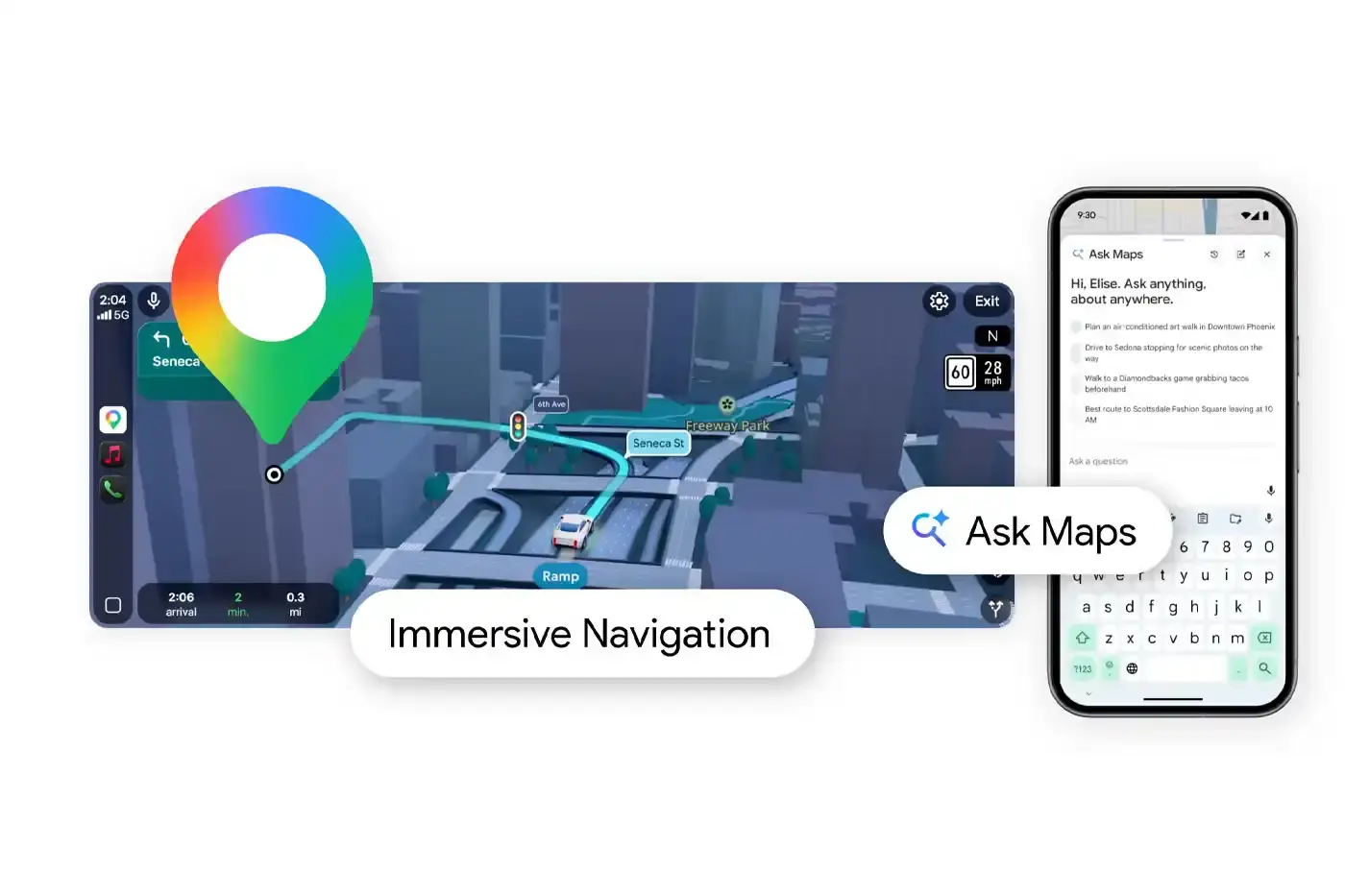
Summary:
- Google updated the Maps application with Gemini artificial intelligence for conversational queries.
- The software provides an updated 3D driving view with precise lane guidance.
- The initial release covers the United States and India for iOS and Android devices.
Google is updating the Maps application with Gemini artificial intelligence. This release introduces conversational search capabilities and updated visual navigation features. The company refers to these additions as Ask Maps and Immersive Navigation. You now interact with the platform using natural language instead of standard keywords. The system processes complex questions about local businesses and daily routing. The software functions as an active digital assistant for urban environments.
Users regularly search for specific locations under tight constraints. You often need a coffee shop with available power outlets and no queue. You type your exact requirements directly into the search bar. The system reads the full request and returns tailored recommendations. The software draws information from an extensive database. Google maintains active records on 300 million global places. The platform also processes constant updates from 500 million community contributors. The Gemini integration synthesizes all available data to answer your specific questions. The application presents options in a direct conversational format rather than a standard list of links. The system reviews user feedback and business details simultaneously. The software filters out irrelevant locations automatically. You save time during the planning phase of your trip. The interface allows you to ask follow-up questions about the same location. You keep refining your search until you find the exact destination.
The navigation interface also undergoes a major revision. You receive an updated visual perspective while driving. The screen displays a dynamic 3D view of the physical environment. The software renders surrounding buildings and terrain features accurately. The application shows overpasses and complex intersections with high clarity. Drivers often face stress during complex traffic maneuvers. The visual interface highlights crosswalks and stop signs to improve situational awareness. The system provides clear lane guidance well before you reach a turn. The application reduces ambiguity during high-speed highway driving. You see exactly where your vehicle needs to be positioned. The screen minimizes distractions by removing unnecessary map clutter. The map focuses entirely on the critical elements of your immediate route.
Voice directions receive an upgrade alongside the visual changes. The audio guidance sounds noticeably more natural. The voice instructions mimic a passenger giving directions. The system avoids robotic phrasing and uses clear conversational cues. The application gives you specific details about alternate routes. You see direct comparisons of different paths to your destination. The interface displays traffic delays and toll costs clearly. The application helps you evaluate tradeoffs before you begin your journey. The software also provides granular arrival assistance. You receive specific guidance for parking lot entrances. The application points out exact building access points. The system removes the confusion of finding a specific door in a massive commercial complex. The application guides you through the final steps of your trip.
Daily commuters benefit directly from the real-time route analysis. You enter your workplace destination during morning rush hour. The system evaluates current traffic patterns and historical data simultaneously. The application presents multiple viable routes on your screen. You see the exact time differences between taking the highway or using local roads. The software calculates fuel efficiency and expected delays for each option. You make an informed decision based on your current priorities. The application adjusts the route dynamically if conditions change while you drive. You receive immediate notifications about new accidents or sudden road closures. The system reroutes your vehicle automatically to avoid complete stops. You maintain a steady pace during your commute. The updated interface provides precise coordination during heavy traffic periods.
The conversational search feature is currently active for mobile users. The initial release targets mobile device owners in the United States and India. The application supports iOS and Android operating systems equally. The 3D navigation features are launching on a different timeline. The company releases the visual updates across the United States first. Developers plan subsequent releases for additional regions in the coming months. You need to keep the application updated to access the new features. The company pushes the software changes server-side. The user experience changes without requiring a manual download. The Gemini integration updates standard digital mapping protocols. The application requires less manual filtering from the user. You rely on the system to parse data and present optimal choices.
Thomas Gabe
is a seasoned technology editor based in Berlin, Italy. With over 5 years of experience, Thomas excels at making complex tech topics. He holds a Computer Science degree and in his free time, he enjoys experimenting with gadgets and mentoring budding tech journalists.
Share this article
RELATED


NOTHING RELEASES HEADPHONE (1) PRO

META DEBUTS NEW SMART GLASSES LINEUP

PPLE DROPS IPHONE 18 PRO AND FOLDABLE DUO
